服務器自助重裝系統/服務器重裝系統
來源:數分科技 編輯:數分科技編輯部 時間:2018-04-04 11:14
數分科技-香港獨立服務器SonderCloud支持在線自助重裝系統功能,目前支持重裝的系統包括:
• Windows 系統
Windows Server 2008R2 中文 數據中心版 64位
Windows Server 2008R2 英文 數據中心版 64位
Windows Server 2008R2 中文 企業版 64位
Windows Server 2008R2 英文 企業版 64位
Windows Server 2008R2 中文 標準版 64位
Windows Server 2008R2 英文 標準版 64位
Windows Server 2008R2 中文 WEB 64位
Windows Server 2008R2 英文 WEB 64位
Windows Server 2012R2 中文 標準版 64位
Windows Server 2012R2 英文 標準版 64位
Windows Server 2012R2 中文 數據中心版 64位
Windows Server 2012R2 英文 數據中心版 64位
Windows 7 中文 旗艦版 64位
Windows 10 中文 企業版 64位
Windows Server 2016 中文 數據中心版 64位
Windows Server 2016 英文 數據中心版 64位
Windows Server 2016 中文 標準版 64位
Windows Server 2016 英文 標準版 64位
• CentOS 系統
CentOS-6.5 64位
CentOS-6.9 64位
CentOS-7.4 64位
• Ubuntu 系統
Ubuntu-14.04-Server-LTS 64位
Ubuntu-16.04-Server-LTS 64位
注意:
2、爲確保服務器穩定性,重裝系統操作每週最多可執行 5次;超出5次將無法重裝。
自助重裝系統-步驟:
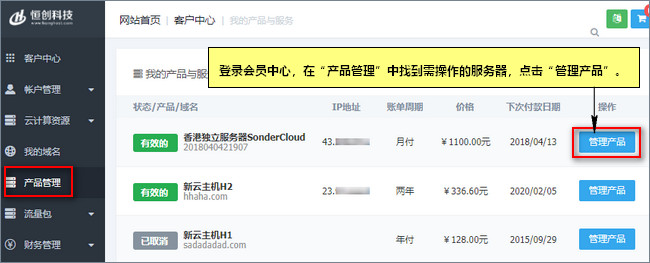
1、登錄會員中心,在左側導航欄“產品管理”中找到需要重裝系統的服務器,點擊“管理產品”。
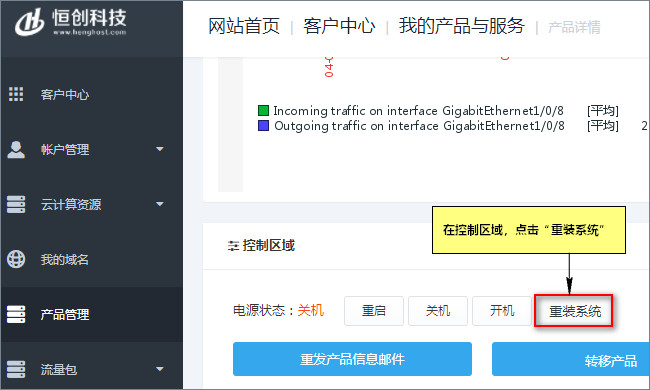
2、在“控制區域”點擊“重裝系統”。
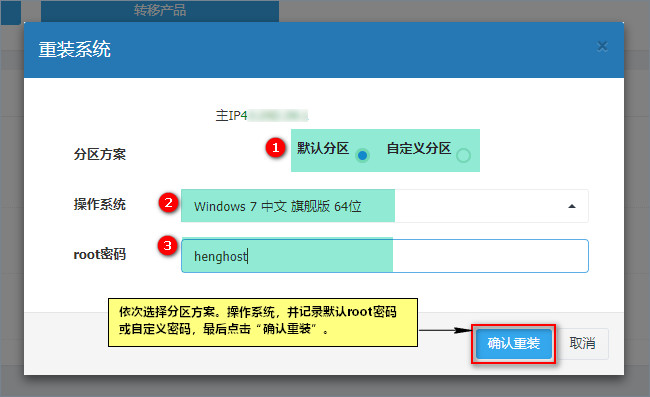
3、依次選擇分區方案、操作系統,並記錄默認root密碼或自定義密碼,最後點擊“確認重裝”即可開始系統重裝。
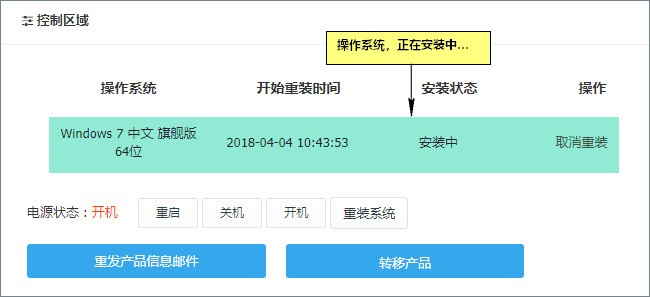
4、等待操作系統安裝完成即可。預計需要時長 20-50分鐘。
- 上一篇: 自助域名取回/域名找回
- 下一篇: 在線付款操作手冊/賬單支付流程
 我的購物車
我的購物車